
Beyond just software, what essential components truly empower a Geographic Information System?
If someone asks, “What is GIS?” the easy answer is that it’s software for making maps and analyzing spatial data. In reality, though, it’s a powerful system composed of multiple parts. I like to think of it as a team (see Figure 1-1), with each member playing a necessary role. Together, what they create sometimes even seems magical. Meet the five players of Team GIS:
GIS is just a piece of software for mapmaking.
GIS is a powerful collective system, integrating hardware, software, data, methods, and people to solve complex problems.
- Computer hardware: The machines and devices that process and display GIS data
- Geographic software: The programs that help you analyze and visualize data
- Data: The fuel that drives GIS (Without it, you have nothing to analyze!)
- Methods: The techniques and workflows that turn raw data into meaningful insights
- People: Professionals across countless fields to solve real-world problems
Read on to take a look at what each of these components brings to the GIS collective.
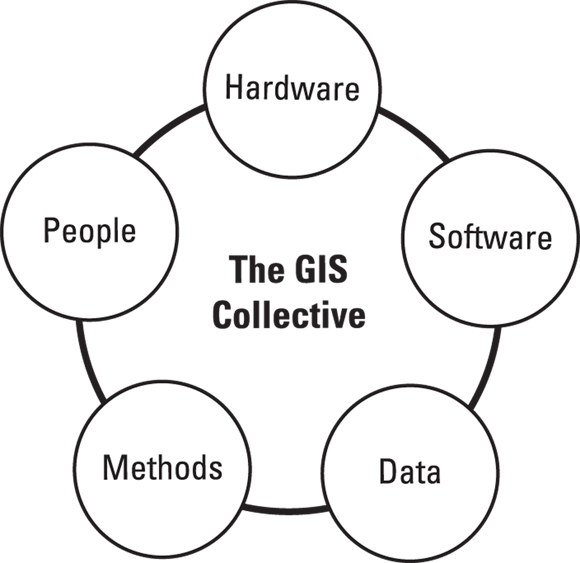
Together, what they create sometimes even seems magical.
Think about a time you used a map app on your phone, like Google Maps or Apple Maps. Which of the five GIS Collective components (Hardware, Software, Data, Methods, People) can you identify at play in that experience?
- Identify the hardware you used.
- Name the software application.
- What kind of data was being displayed or used?
- What methods were likely employed to create and update that data?
- Who are the "people" involved in making that app and its data useful?
Computer hardware
GIS software does the heavy lifting, but hardware is what makes it all possible. Modern GIS doesn’t just run on desktops anymore; you find GIS on laptops, tablets, mobile devices, and even cloud servers. Here’s a quick look at the hardware that keeps your GIS running:
- Data collection devices: These devices include GPS units, drones, satellite sensors, and even smartphones that gather geographic data. The data may come from a field scientist recording wildlife locations or a drone mapping a construction site, but GIS always starts with data collection.
- Input devices: You can enter data directly into GIS using onscreen digitizing, scanners, and even manual digitizers (if you can find one outside a museum!).
- Data storage and processing: GIS deals with huge amounts of data, so having the right hard drives, cloud storage, memory, and high-performance computing makes a big difference to effective use and management of all that data.
- Output devices: Monitors, printers, and plotters (large-format printers) help you visualize and share your GIS work. You can display it through an interactive map on your screen or a printed map for a presentation, but GIS results need to be seen!

Hardware Compatibility & Investment
Before you invest in GIS software, make sure that it’s compatible with your hardware. Also, don’t fall into the trap of thinking that the most expensive setup is the best; you can always upgrade as your GIS needs grow. Most GIS software includes documented minimum system requirements, and often includes recommended specifications that go beyond that. For best performance, and to avoid future frustrations, start with the recommended rather than the minimum (Future You will thank you).
How has the evolution of hardware (from desktops to mobile and cloud) expanded the possibilities and accessibility of GIS?
Early GIS systems in the 1960s often required mainframe computers and specialized input devices that were room-sized! Today's smartphones pack more GIS processing power than entire research labs of fifty years ago.
Geographic software
GIS software is the engine that drives geographic analysis. Beyond just storing and displaying maps, GIS helps you uncover patterns, relationships, and trends in your data. Here are some of the capabilities that make GIS software powerful:
- Interactive analysis: Say that you need to see how urban growth affects green spaces. GIS lets you layer different datasets to find hidden trends.
- 3D Visualization: Modern GIS offers more than just flat maps. Many tools can now display elevation models, create fly-through animations, and even create digital twins, or virtual replicas of cities, buildings, or entire environments that update with real-world data.
- Real-time data integration: Live traffic feeds, weather updates, and satellite imagery can all be integrated into GIS, giving you up-to-the-minute insights.
A virtual replica of a physical object, system, or environment that is continually updated with real-world data, allowing for real-time monitoring, analysis, and simulation.
Want to go deeper? The Power of Real-Time Data
Real-time data integration in GIS is revolutionizing various fields. For example, in disaster management, live feeds from weather sensors, traffic cameras, and social media can be combined in GIS to provide emergency responders with an immediate, dynamic overview of a situation, helping them allocate resources more effectively. In urban planning, real-time data from smart city sensors can monitor air quality, pedestrian traffic, and energy consumption, enabling planners to make data-driven decisions for sustainable development.
Following are just some of the ways people use GIS software:
An environmental scientist overlays vegetation data on a 3D terrain model to study how elevation affects plant growth.
A real estate agent pulls up a map showing houses within the client’s price range, complete with property details and virtual tours.
A city planner presents an animated time-lapse video showing how urban sprawl has changed over the past 30 years.
A national park visitor uses an interactive GIS app, taking a virtual fly-through tour of a hiking trail before visiting.
GIS software offers myriad possibilities to help you understand the world around you in new ways.
How does GIS software's ability to layer datasets, visualize in 3D, and integrate real-time information transform our understanding of geographic patterns?
- The GIS Collective consists of Hardware, Software, Data, Methods, and People.
- Hardware provides the physical foundation for GIS, from data collection to output.
- GIS software is the analytical engine, enabling interactive analysis, 3D visualization, and real-time data integration.
Geographic data
Hardware and software are the driving forces behind GIS analysis and products, but data provide the fuel. No data, no GIS. GIS works with many types of data, but they’re easier to understand when grouped into two basic categories:
- Primary data: Data you collect yourself. This is data gathered firsthand for a specific purpose. Because you’re in control, this data is often the most reliable and tailored to your needs. Examples include:
- GPS field surveys: Mapping roads, trails, or invasive plant species
- Drone imagery: Capturing high-resolution aerial views of construction sites, crops, or coastlines
- Sensor readings: Recording environmental conditions, like temperature, air quality, or water levels
- Crowd-sourced data: Using data contributions from citizen science projects like iNaturalist or OpenStreetMap.

Data is the Fuel
Without data, you have nothing to analyze! The quality and relevance of your data directly impact the insights you can gain from GIS.
Geographic data collected firsthand by the user for a specific purpose, offering high reliability and tailored relevance.
Verifying Crowd-Sourced Data
While crowd-sourced data can be incredibly valuable and vast, it's crucial to verify its accuracy and reliability, as quality can vary widely depending on the source and collection methodology.
Think about a local issue you care about (e.g., park maintenance, traffic congestion, local wildlife). What kind of primary data could you collect yourself to better understand or address this issue using GIS?
Which of the following is NOT considered one of the five essential components of the GIS Collective?